Five-Spice Fury currently has 64 playable characters (approximately, at the time of writing...) in total (roughly half are 'Vessels', manifestations of the characters willpower). Each one needs pose sheets, gem animations, block animations, damage tiers, cooking effects, borders — about 8 sprite sheets per character. That's over 500 final assets (each being a sheet containing more than one item), all in a consistent "80s noir kung-fu cinema meets battle shonen anime" art style.
I'm one (ambitious) person. What I don't have is an art team or budget. What I do have is knowledge of LLMs, some technical know-how, and a belief of 'I can figure it out'.
So, I started down the path of figuring out how I could use generative AI to help me scale my art ambitions.
I want to be clear up front and say that I don't believe these tools are taking away any professional jobs. I am still/would be interested in paying an artist to go over things and 'unify' the style of everything, creating a cohesion that isn't possible with this style of creation. Unfortunately, the other aspect of that is that as a solo indie dev I don't have the budget for that. So it is what it is.
The Pipeline
Every asset in the game flows through five stages:
Character Identity + Templates
        ↓
   Batch Submission (Gemini / OpenRouter)
        ↓
   AI Image Generation
        ↓
   Vision-Based Validation
        ↓
   Stitching → Final WebP Sprite Sheets
Here's how each one works.
Stage 1: Identity Files + Prompt Templates
Every character starts as a short identity file — a structured description of who they are, what they look like, and how their gameplay elements should feel:
CHARACTER: Hiro
APPEARANCE: 23, lean athletic build, messy black hair with a single
  white streak over his left eye, warm brown eyes, small scar on
  his right cheek from a kitchen accident, calloused hands.
OUTFIT: White chef coat with rolled-up sleeves, black apron tied
  at the waist with a silver buckle shaped like a cleaver, dark grey
  cargo pants, red wristband on his left arm.
PALETTE: Primary #cccccc, Secondary #333333, Accent #e63946.
ELEMENT: Neutral
PERSONALITY: earnest, determined, humble, brave
COOKING STYLE: Fundamentals-focused home cooking — clean knife work,
  simple but perfected techniques, hearty comfort dishes.
GEM THEME: Simple polished river stones with kanji engravings.
BLOCK THEME: Clean ceramic tiles with subtle crack-glaze patterns.
These identity files get combined with prompt templates — one for each asset type (poses, gems, blocks, damage, effects). The template defines the layout, cell positions, and rules. The identity provides the character-specific details. A style directive gets prepended to every prompt to enforce the visual language across all 64 characters:
80s noir kung-fu cinema meets battle shonen anime. Anime cel-shaded illustration with gritty textures, heavy ink linework, and VHS grain. High-contrast noir shadows with dramatic rim lighting and warm amber/red accents. Steam, smoke, and cooking heat fill the atmosphere.
A script called generate-pose-prompts.mjs reads the identity files, plugs them into templates, and spits out fully assembled prompts — one per character per asset type. Around 330 prompt files in total.
Stage 2: Batch Submission
Generating 3000+ images one at a time would be painful. The pipeline supports two submission paths:
Gemini Batch API — builds JSONL files with all the requests bundled together, submits them for asynchronous processing. The big win: 50% cost reduction over real-time API calls. The trade-off is waiting for the batch to complete (usually minutes, sometimes longer).
OpenRouter (concurrent) — fires off requests directly, 10 at a time. Faster turnaround, full price. Good for iteration when you're tuning a single character.
Reason for the OpenRouter support is hitting API limits on Gemini.
# Submit a batch for all characters
node scripts/generate-batch.mjs submit --type poses --provider gemini

# Or iterate on one character fast
node scripts/generate-batch.mjs submit --type poses --filter boy --provider openrouter
The orchestrator script (generate-batch.mjs) handles both paths, tracks batch state, and manages downloads. It's the single entry point for all sprite generation.
Stage 3: AI Image Generation
First thing to point out is you don't want to do individual items. You want sheets, because its going to save you a lot of money. Instead of generating 1 gem per image, generate the entire set, generate all poses for this character as a single pose sheet, etc.
The AI (Gemini 3.1 Flash) generates images in two formats depending on asset type:
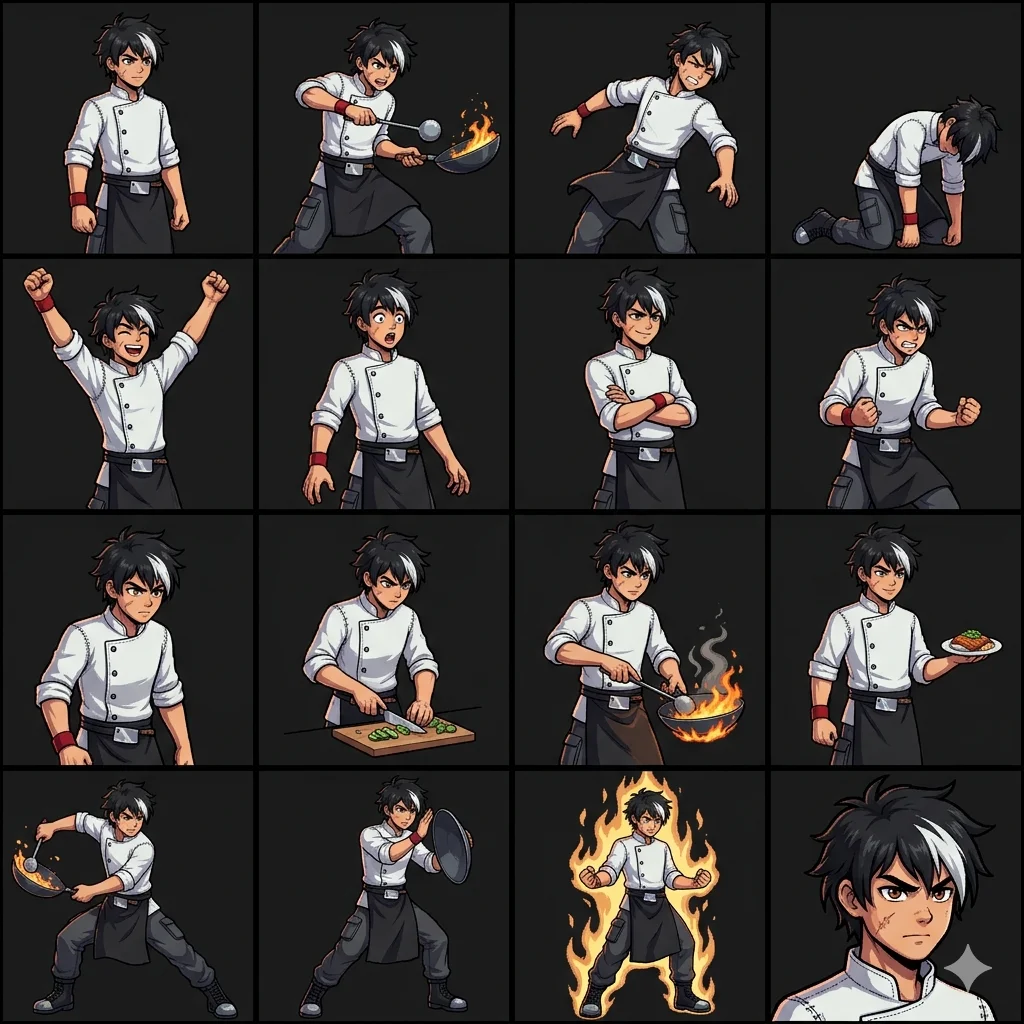
Grid sheets (2048x2048) — used for pose sheets, where each character needs 16 distinct poses arranged in a 4x4 grid. Each 512x512 cell contains exactly one full-body pose: idle, attacking, taking damage, cooking, special moves, and a bust portrait.
Animation strips (2048x512) — used for gems, blocks, and animated poses. Each strip is 4 frames of a single animation sequence. A gem wobble cycle, a block idle shimmer, a character's attack wind-up.
Each character gets its own staging directory where strips accumulate before stitching.
Stage 4: Vision Validation
Of course, that's a lot of images, and while I did also build a manual harness for human review, I got tired of it and figured why not try automating it with a VLM/LLM? I was getting sheets where the AI crammed 2x2 mini-poses inside a single cell, or gave me 12 frames instead of 16, or drifted the character design between cells.
So, the fix ended up being: use another AI to validate the first AI's output.
A validation script sends each generated sheet to Gemini Vision and asks it to check:
- Does each cell contain exactly one character?
- Is the frame count correct for this sheet type?
- Is the character design consistent across all cells?
- Are the cells properly aligned on the grid?
Sheets that fail get flagged for regeneration. Saving me time and frustration with 'Remove the text and change nothing else' 5x over.
Stage 5: Stitching
Animation strips arrive as individual 2048x512 images — one per animation sequence. The stitching step stacks them vertically into final composite sheets:
- 8 gem strips → one 2048x4096 gem animation sheet
- 6 block idle strips + 1 garbage strip → separate idle and destruction sheets
- 10 pose animation strips → one 2048x5120 animated pose sheet (50 total frames)
# Stitch gem animation strips into a single sheet
node scripts/stitch-sprite-sheet.mjs \
  --mode strip \
  --input public/sprites/staging/boy/gems-idle/ \
  --output public/sprites/characters/boy-gems-idle.webp
The stitcher uses sharp for image manipulation — fast, no native GUI dependencies, works in CI. Output is WebP at quality 90, which gives great compression without visible artifacts at game resolution.
The Results
After everything runs, each character ends up with a full set of game-ready assets:


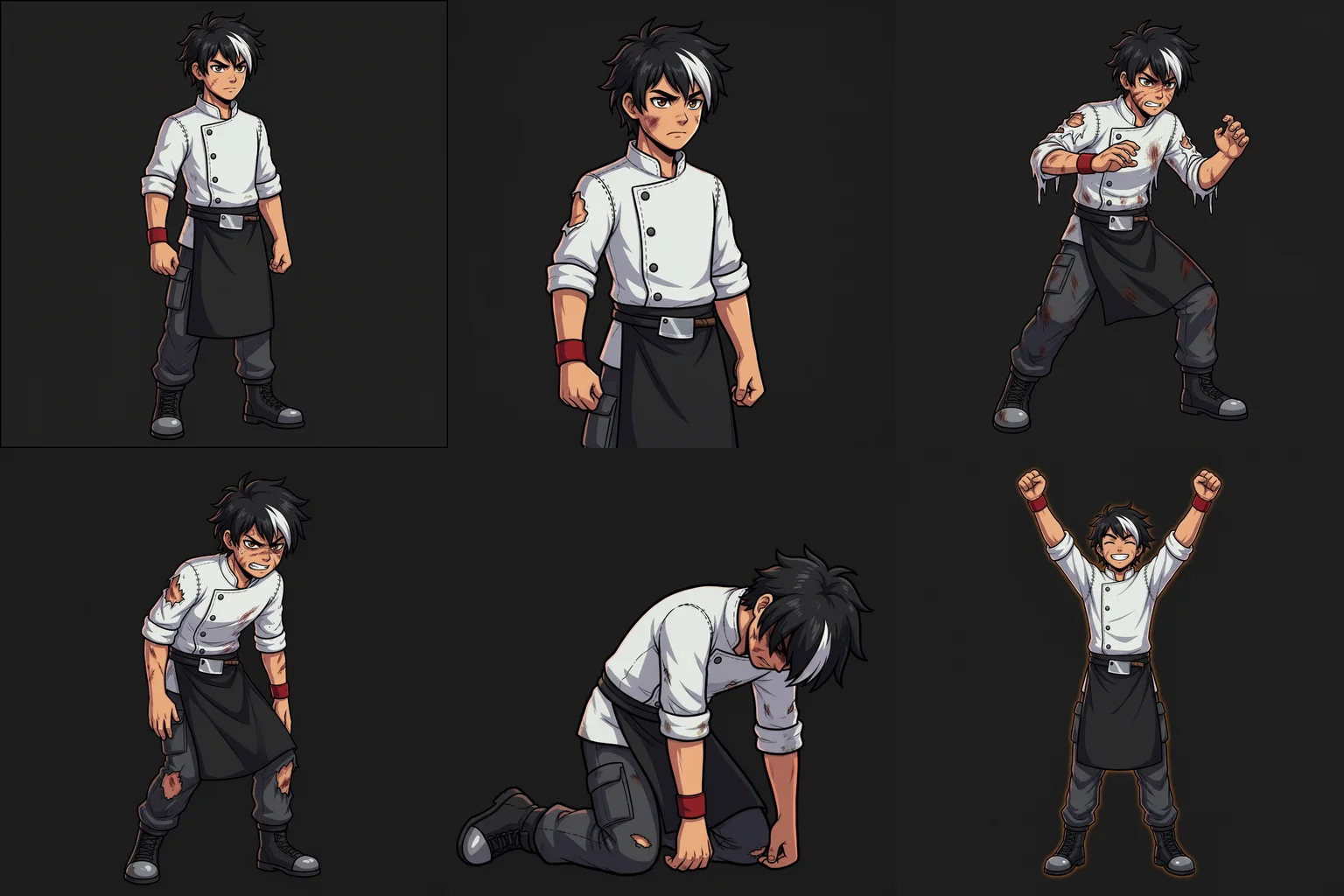
A separate script extracts the bust portrait (cell 16) from every character's pose sheet and composites them into a single bust atlas — used for character select screens, dialogue, and UI.
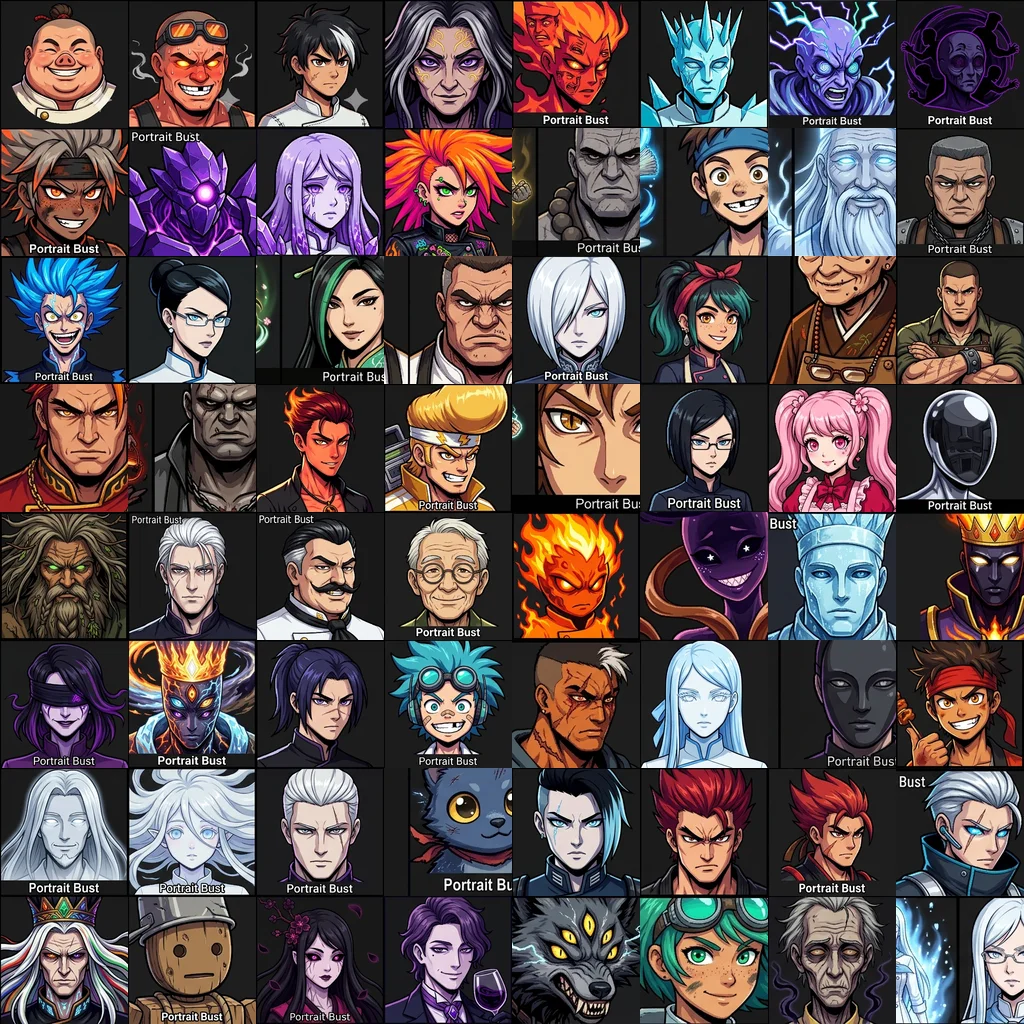
The final count: 64 characters x ~8 sheets each = 438 sprite sheets, plus the bust atlas, plus environment backgrounds. All from one pipeline, all style-consistent, all game-ready.
What I Learned
Templates are the real product. The character identity files and prompt templates are more valuable than any individual generated image. Get the template right once, and every character benefits. Tweak the style directive, and the entire game's art shifts in one generation pass. These are truly amazing.
Validation isn't optional at scale. Vision-based validation caught problems I wouldn't have noticed unless I was paying close attention to detail. The 10-15% failure rate sounds bad, but detecting and regenerating is cheap. Shipping broken sprites/AI slop is not.
Batch APIs change the economics. Gemini's batch API cuts costs in half. So, we always batch when possible.
Prompt engineering at scale is its own discipline. Writing one good prompt is easy. Writing a template system that produces consistent results across 64 wildly different characters — a fire-breathing wok chef, a knife-throwing sushi assassin, a pastry witch — takes iteration. The style directive and technical spec do most of the heavy lifting. DO NOT DROP THE BALL HERE! All the art comes downstream for this, and it can be the difference between capturing your ideas and throwing slop at a canvas.
What's Next
The pipeline keeps growing. Environment backgrounds for all 30 campaign levels are in progress. The roguelite campaign system is taking shape. And there are always more characters to add to the roster.
Thanks for reading, and stay hungry.